
Collect context
Stage 1Clean handles, platform, location, and partnership intent.
124
Submissions
A five-stage process for qualifying, filtering, inspecting, and routing inbound creator applications before manual review consumes your week.
Trigger Warning "OMG I love your product. I'd be happy to make a video for my audience if you guys sent me a free ____."
I know you've seen this a million times. But sometimes it's actually a good opportunity. But how are marketing teams expected to manage all the parntership inbound requests that they're inundated with?
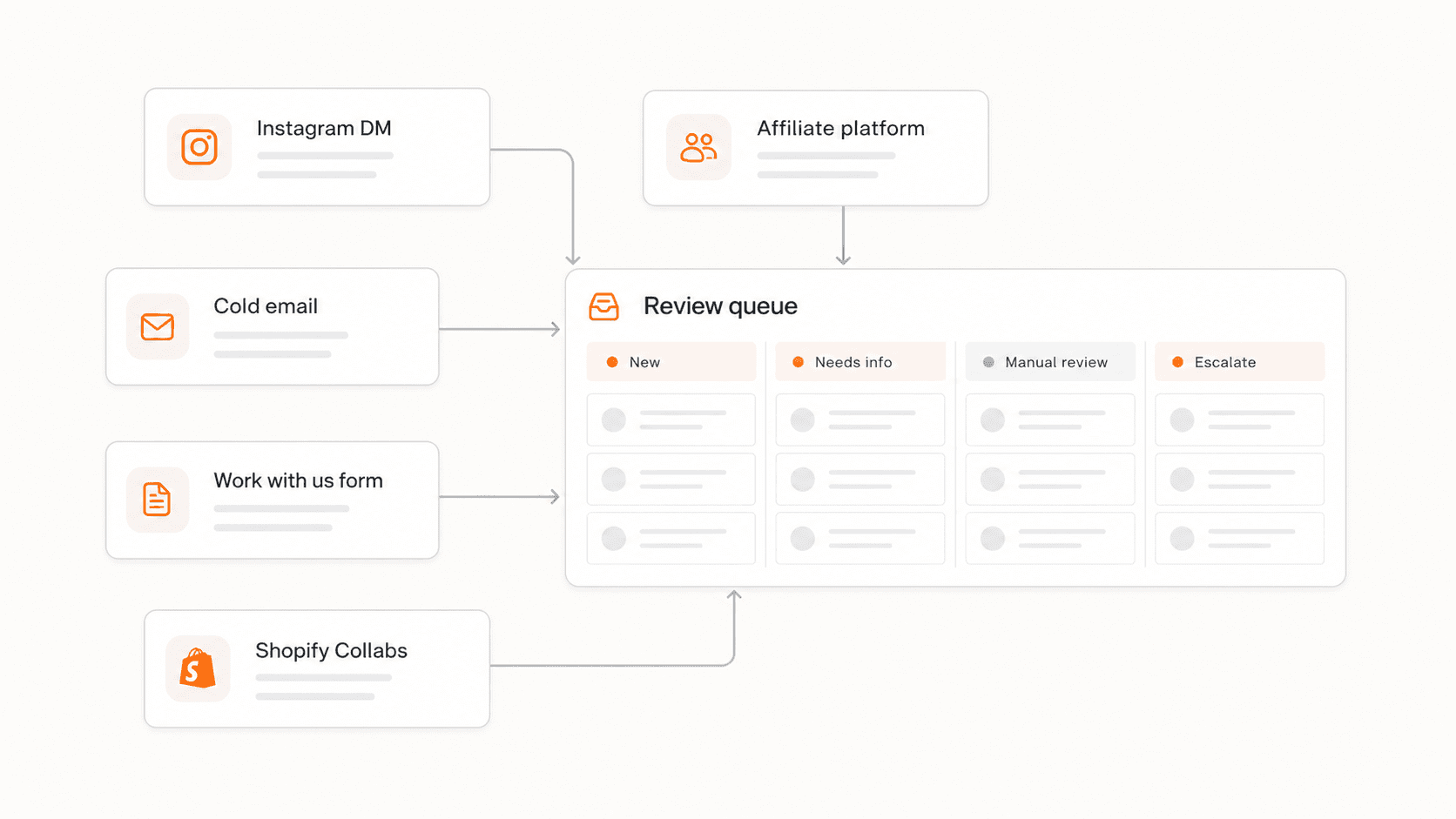
A creator DMs the brand's Instagram account with a portfolio link. Another submits through the affiliate platform with half baked details. A third sends a long cold email with a media kit and a rate card. A fourth fills out the "work with us" form correctly. A fifth comes in through Shopify Collabs with a handle but no other context.
All five are viable forms of inbound, but it's basically impossible to manage.
Plus, how are you supposed to know which ones deserve the time, and how do you decide that before opening every profile and starting from scratch?
The answer (and yes it's boring) is to vet inbound creator applications by moving each submission through a consistent sequence before manual review begins. Collect the context the team needs, remove obvious mismatches early, inspect the profiles that look genuinely promising, check for sponsor conflicts and obvious concerns, and assign every submission a clear next action.
That sequence separates two things that teams often conflate: application quality and creator quality. A creator who gives your team all the right details doesn't make them worth spending time on. And a creator who submits a short, incomplete application is not necessarily a poor performing creator.
Most teams that receive meaningful inbound creator interest reach a tipping point where the manual process stops scaling.
At 10 inbound submissions per month, individual review is manageable. At 40 or 60, it creates backlogs. At 100 or more, teams start making decisions based on submission order, the subject line of an email, or whoever happened to surface a creator in a Slack thread that morning. Or, sometimes teams just stop responding all together.
Without a consistent review process, a few things tend to happen:
This is why the boring answer is all about process.
Each stage narrows the pool so reviewers spend judgment on the applications that still have a real case.
Collect context
Stage 1Clean handles, platform, location, and partnership intent.
124
Submissions
Apply hard filters
Stage 2Remove clear no-fits before anyone opens the profile.
82
Submissions
Inspect profiles
Stage 3Read recent posts, comments, and product context.
39
Submissions
Check sponsor patterns
Stage 4Look for conflicts, ad density, and disclosure habits.
18
Submissions
Route next action
Stage 5Approve, hold, decline, or escalate with a note.
11
Submissions
Vetting inbound creator applications efficiently requires a consistent sequence. The order matters because each stage reduces the pool that enters the next one.
Before any profile gets reviewed, the submission should contain enough context to support a first-pass.
Useful information usually means:
That information does not need to come from a long form. A short, well-structured intake form that asks for the right fields up front saves significant review time downstream.
Submissions that arrive without a usable handle or a clear platform should move to a waiting state while a brief follow-up is sent. Asking for a profile link is a reasonable first step before investing review time. A creator who does not respond to a simple information request is worth noting — it tells you something about what future collaboration would look like.
For a detailed set of intake questions to use here, see the best questions to ask on a creator application form.
Once the submission is complete, apply fast binary filters before any manual profile review begins.
Hard filters remove obvious mismatches: creators clearly outside the target market, unconnected to the product category, requesting a partnership model the brand does not offer, or submitting from a region the brand cannot serve. These filters do not require human judgment, they just require pre-determined filters.
| Filter | What it removes | Route |
|---|---|---|
| Audience location | Creators outside the brand's geographic reach | Decline or hold |
| Content category | Creators with no connection to the product category | Decline before manual review |
| Partnership model | Creators requesting a model the brand does not offer | Decline or redirect |
| Platform activity | Creators without an active profile on a relevant platform | Ask for information |
| Handle completeness | Submissions without a usable handle or link | Ask for information |
| Competitive conflict | Creators with an active direct competitor partnership | Escalate or hold |
A creator who fails a hard filter should be declined quickly. The decline does not need to be long or personalized. A short note that the creator is outside the current program parameters is enough. A fast, honest no is better for a creator than an indefinite wait.
A creator who passes all hard filters enters the manual review queue.
Profiles that clear the hard filters deserve another 5-10 minutes of the marketing team's time. This is where the review moves from information management to human judgment.
Open the creator's most recent 20 to 30 posts. Look for the actual content landscape like current themes, formats, tone, and product context. A creator's category label in their bio may not match what they have been posting for the last six weeks.
A reviewer running a practical manual inspection is asking:
Write down what you see. A profile note that says "recent content is mostly wellness and fitness routines, with a few budget supplement comparisons — possible fit for the protein line" is useful. A note that says "good content" is not.
For more on what to inspect during a manual profile review, use the creator vetting checklist.
Sponsorship history is a separate review category from content review. A creator can have excellent recent content and still be a poor fit because of active competitor partnerships or unusually high sponsor density.
Check the last 60 to 90 days. Look for:
Sponsor history can tell you a lot about whether a creator is performing well within their category or not. A creator who works with three or four brands in different categories is operating normally. A creator whose feed is mostly sponsored posts across a dozen different products is in a different position.
Any submission with a recent direct competitor post should be declined quickly, or escalated for review from a higher-up if brand guidelines are tolerant of competitive ad placements.
Every submission that completes the review process should leave in a defined state. Without a decision, the submission stays in a gray area, adding debt to the marketing team's creator queue.
Approve for deeper review. The creator passes all filters, the profile inspection supports the partnership, and no major concerns appeared in the sponsor check. The submission moves into the next stage of outreach or review.
Hold. The creator is relevant but not right for the current campaign — timing, budget, or program focus. Hold with a specific note about when to revisit. Hold is not a soft decline; it requires a follow-up trigger.
Decline. The creator does not match the current program. Send a brief, prompt response.
Escalate. The creator has real upside alongside a concern that one reviewer should not own alone. Send to the right decision-maker with a short note explaining both the strength and the concern.
Route the review while the details are still fresh. A submission that sits unrouted for two weeks requires the next reviewer to start over.
Here's a quick way to turn this into a usable spreadsheet for your team. (Make sure to adapt this to your actual program.)
| Submission type | Hard filter result | Manual review needed | Next step |
|---|---|---|---|
| Complete form, strong category match | Passes all filters | Yes | Approve for review |
| Complete form, audience outside shipping region | Fails location filter | No | Decline |
| Incomplete form, no handle provided | Incomplete | No | Ask for information |
| Good content, direct competitor post in last 30 days | Passes other filters, flags competitor | Conditional | Escalate |
| Relevant category, high ad density across recent posts | Passes filters | Yes | Hold pending deeper review |
| Wrong product category, high follower count | Fails category filter | No | Decline |
| Strong niche fit, recent content appears thin | Passes filters | Yes | Light review, note content concern |
The triage table is a routing system, not an approval system. Approvals happen after manual review and a documented note.
Not every part of inbound vetting requires human judgment.
Completeness checks — whether a submission includes a handle, a platform, and a stated partnership interest — can be systematized through a well-structured intake form. Hard filters based on audience location, content category, or platform presence can also be applied consistently without case-by-case judgment.
Manual profile inspection, sponsor history review, and fit judgment require a actual review. A creator's recent content pattern, audience engagement quality, and credibility as a brand partner are not decisions a form or a filter can make.
The best vetting process uses structure for what can be systematized and human review time for what actually requires it. That distinction is how lean teams stay consistent as inbound volume grows.
If your team is building the intake structure that feeds this vetting process, read how to manage inbound creator partnership requests for the full workflow setup, and how to prioritize influencer applications to decide which submissions deserve the most review time. Once a creator reaches the manual inspection stage, the creator vetting checklist covers what to inspect in depth. For teams deciding which partnership model fits a creator who passes review, gifting vs affiliate vs paid walks through the routing logic.
Vetting inbound creator applications becomes faster and more consistent when the review has the right structure: a form that collects decision-useful context, hard filters that remove clear mismatches before manual review begins, profile inspection focused on recent content and audience signals, a sponsor check before any approval, and a clear decision making step for every submission.
Applying the same depth of review to every submission is what creates bottlenecks. Applying the right depth to the right submissions, and denying poor fits quickly, is what keeps inbound review manageable as volume grows.
Threshold helps teams move inbound creator review out of scattered inboxes and into a consistent workflow where submissions are filtered, reviewed against shared criteria, and routed with documented notes — so the team spends time on the right candidates instead of starting over on every profile.
FAQS
Vetting inbound applications is the earlier step. It determines whether a submission has enough context to review and whether the creator clears basic filters before a full manual evaluation begins. Creator evaluation is what happens once a promising submission has passed those filters — it covers recent content, audience signals, brand fit, sponsor history, and risk flags in depth.
Run a batch cleanup using the hard filters first. Apply each filter to every submission in the backlog and decline or hold anything that fails. This usually reduces the reviewable pool significantly and creates a working queue from what was a pile. After cleanup, set a regular review cadence — weekly or biweekly — so the backlog does not rebuild.
No. Review depth should match the partnership being considered. A gifting candidate needs a lighter pass than a paid campaign candidate. A creator with a high follower count and an unusual engagement pattern needs more scrutiny than a smaller creator with a clear content niche and readable comments. Apply the same stages to every submission, but adjust the time and detail you invest based on what the partnership would actually require.
A decline should be brief and prompt. It does not need to explain every reason for the decision. A note that the creator is outside the current program parameters — geographic scope, category focus, or partnership model — is usually enough. Avoid vague language like 'not a fit at this time' without any context. A clear decline is more respectful to the creator than an indefinite hold or no response.
After the submission passes all hard filters, clears the manual profile inspection, shows no major sponsor conflicts or risk flags, and receives a written review note that explains why the creator is a reasonable fit. At that point the submission moves from intake into a real approval conversation — not before.
SOURCES
RELATED RESOURCES
Learn how to manage inbound creator partnership requests with structured intake, triage, and routing.
Learn how to prioritize influencer applications with a tiered review system based on fit signals, not submission order.
Use this creator vetting checklist to review fit, audience quality, sponsor context, and risk before your team approves DTC creator partnerships.
Threshold helps teams turn scattered creator signals into clearer review decisions.